
TLDR
Andy Toizer built a CRM dedupe agent in Claude Code that cleared a 2,000 contact and 1,046 company backlog, then turned the workflow into a daily system. The agent now handles the easy merges on its own, suppresses known non-duplicates, and sends only the uncertain cases to a human in Slack with the evidence already pulled. The build started as one repo and one overloaded context window, then became an orchestrator with five specialists, tighter guardrails, and a pattern any GTM operator can copy.
About Andy
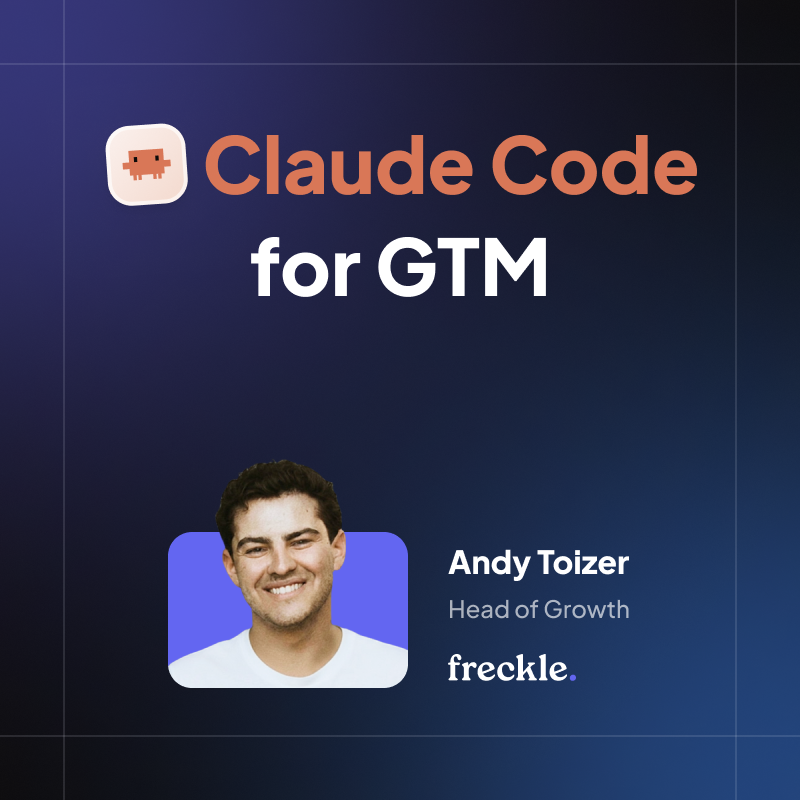
Andy Toizer is Head of Growth at Freckle.io and previously co-founded Telltale Group, where he built growth engines that drove tens of millions in B2B pipeline. He also writes AgentOperator, a newsletter focused on building practical GTM systems with agentic tools.
The problem
Even a well-run CRM collects duplicates. It’s one of those operational problems that is rarely urgent enough to interrupt the week, but always annoying enough to quietly make everything worse.
A person signs up with a personal email, then later appears under their work email. A company has a .com and a .io. Someone changes jobs. Someone gets imported from a partner list with just enough missing fields to make the record look new. The CRM flags the issue, but the decision still lands with a human.
So the pattern becomes familiar. Once a quarter, ops exports a list, runs a dedupe tool, and spends part of a Friday hand-merging the weird cases. The obvious ones are easy. The dangerous ones are not. Merge the wrong records and you damage account history. Refuse to merge anything uncertain and the backlog grows forever.
Andy wanted to test the limits of Claude Code against a real GTM problem. Could it reason through messy CRM data, respect merge safety, and land on a better-fit workflow than the quarterly cleanup cycle?
The goal was simple: run every day, clear the easy cases automatically, and send only the ambiguous ones to a person with the evidence already gathered. In other words, turn CRM dedupe from a recurring cleanup ritual into a daily agentic workflow.
V1: one repo, one context window
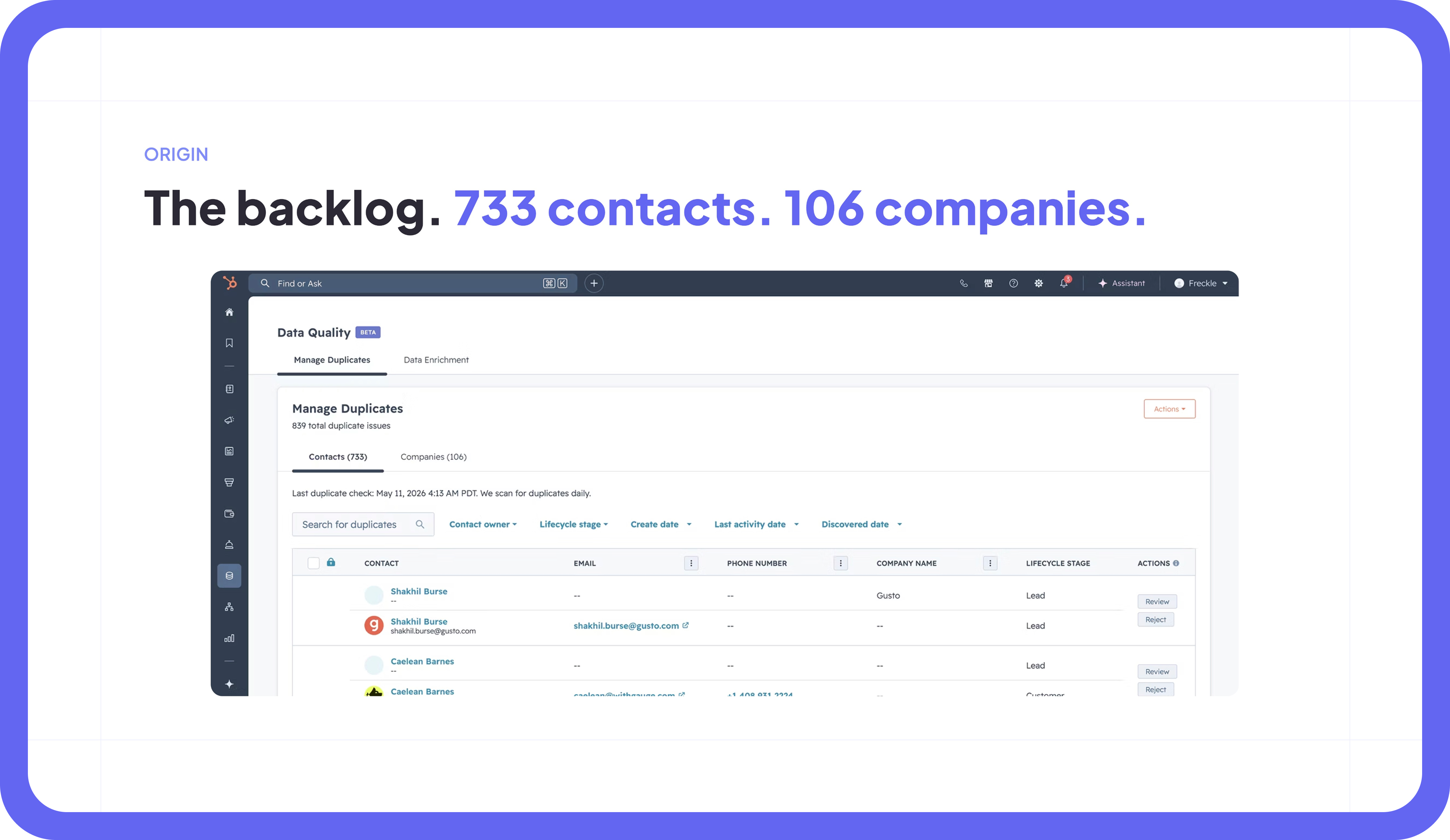
Andy built the first version on a Wednesday with Claude Code open and a real backlog in front of him. No abstract demo. No fake dataset. Just 733 duplicate contacts and 106 duplicate companies sitting in HubSpot, waiting for someone to deal with them.
By the end of the day, he had a working agent. It lived in one repo with nine top-level directories: agents, pipeline, review, scheduler, db, notifications, config, tests, plus a CLAUDE.md and a README. It could pull candidate pairs, score them, make merge decisions, and move through the backlog.
It worked, which is usually the first dangerous moment in any internal automation project.
The issue was not whether the agent could do the job once. It could. The issue was what happened as the workflow became more complex. Every task loaded too much of the repo. Context started getting expensive. Plans got longer. The agent would make a decision in one part of the run, then lose the thread a few messages later. The system had technically shipped, but it was starting to feel like one very smart person carrying every possible instruction in their head at once. Impressive, but not how you want to run operations.
Then came the first live-run scare.
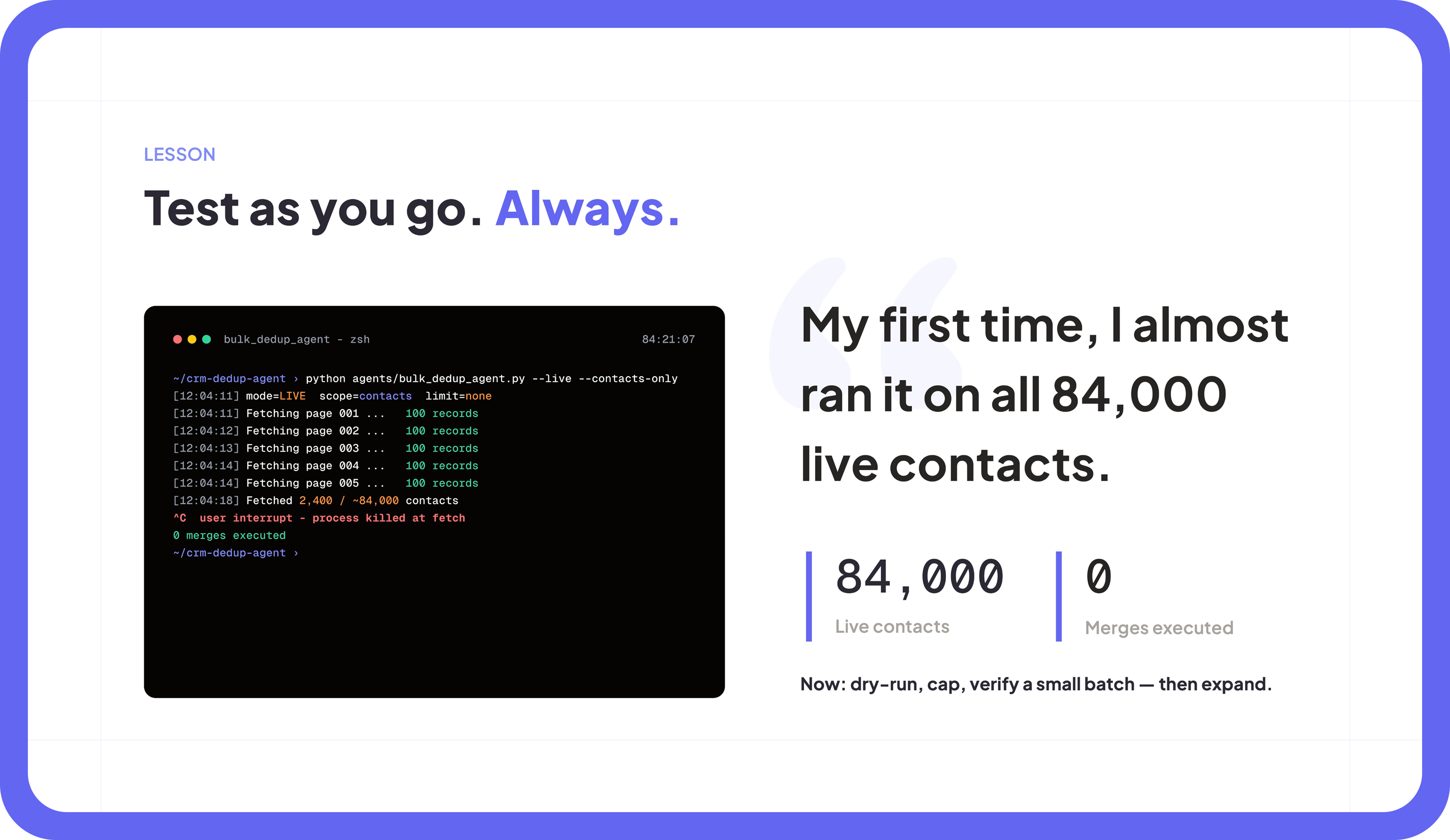
Andy meant to test on a small batch. Instead, the agent started paging through all 84,000 contacts in HubSpot. He caught it by page five, with zero merges executed, and hit cancel. No real damage done, but the lesson was immediate: an agent does not know that “be careful” means “do not point yourself at the entire CRM unless I explicitly say so.”
After that, the defaults changed. Dry run on. Row cap mandatory. Small verified batch before anything touches production. The kind of guardrails that feel obvious right after you almost learn them the hard way.
V2: an orchestrator and five specialists
The second version split the work.
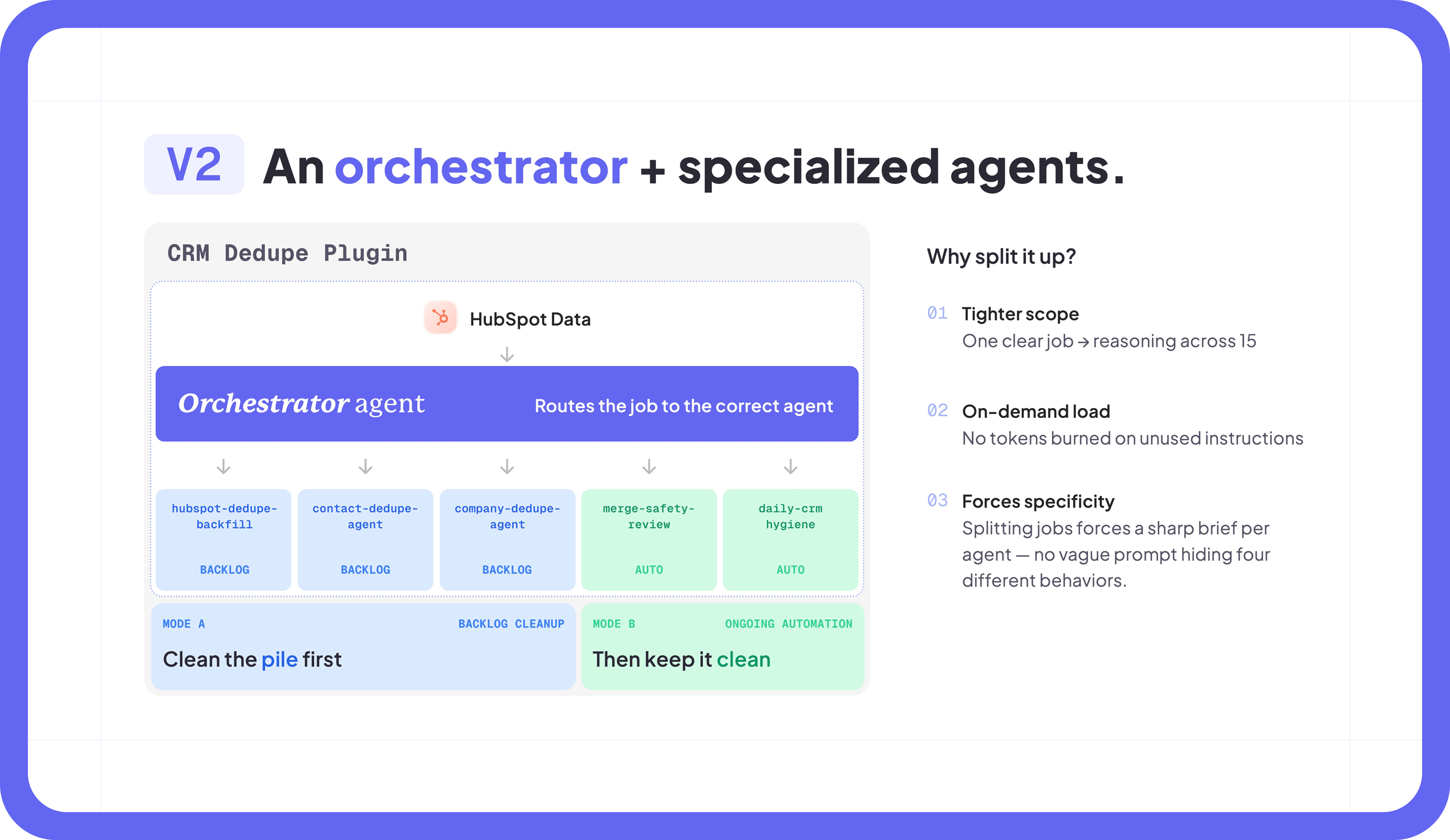
Instead of asking one agent to understand the entire system every time, Andy moved to an orchestrator-plus-specialists model. The orchestrator reads the job, decides what kind of work it is, and routes it to the right specialist. Each specialist has one job and a much smaller surface area.
The five specialists are:
hubspot-dedupe-backfill– which clears the existing backlogcontact-dedupe-agent– which handles new duplicate contacts as they appearcompany-dedupe-agent– which handles new duplicate companiesmerge-safety-review– which checks edge cases before anything risky happensdaily-crm-hygiene– which keeps the workflow running continuously
This made the system easier to trust for a very practical reason: every agent had a clearer contract. The orchestrator only needed enough context to route the job. The specialist only needed enough context to do its job well. No one was trying to hold the entire CRM universe in one context window.
The benefit was not just technical. Splitting one broad agent into five narrower ones forced the thinking to get cleaner. What does this agent own? What does it never touch? What inputs does it need? What output should it return? Where does a human need to review?
That is usually where the quality of an agentic workflow is decided. Not in the cleverness of the prompt, but in whether the job has been defined clearly enough that the agent can do it repeatedly without turning into a very expensive intern with root access.
How a pair becomes a decision
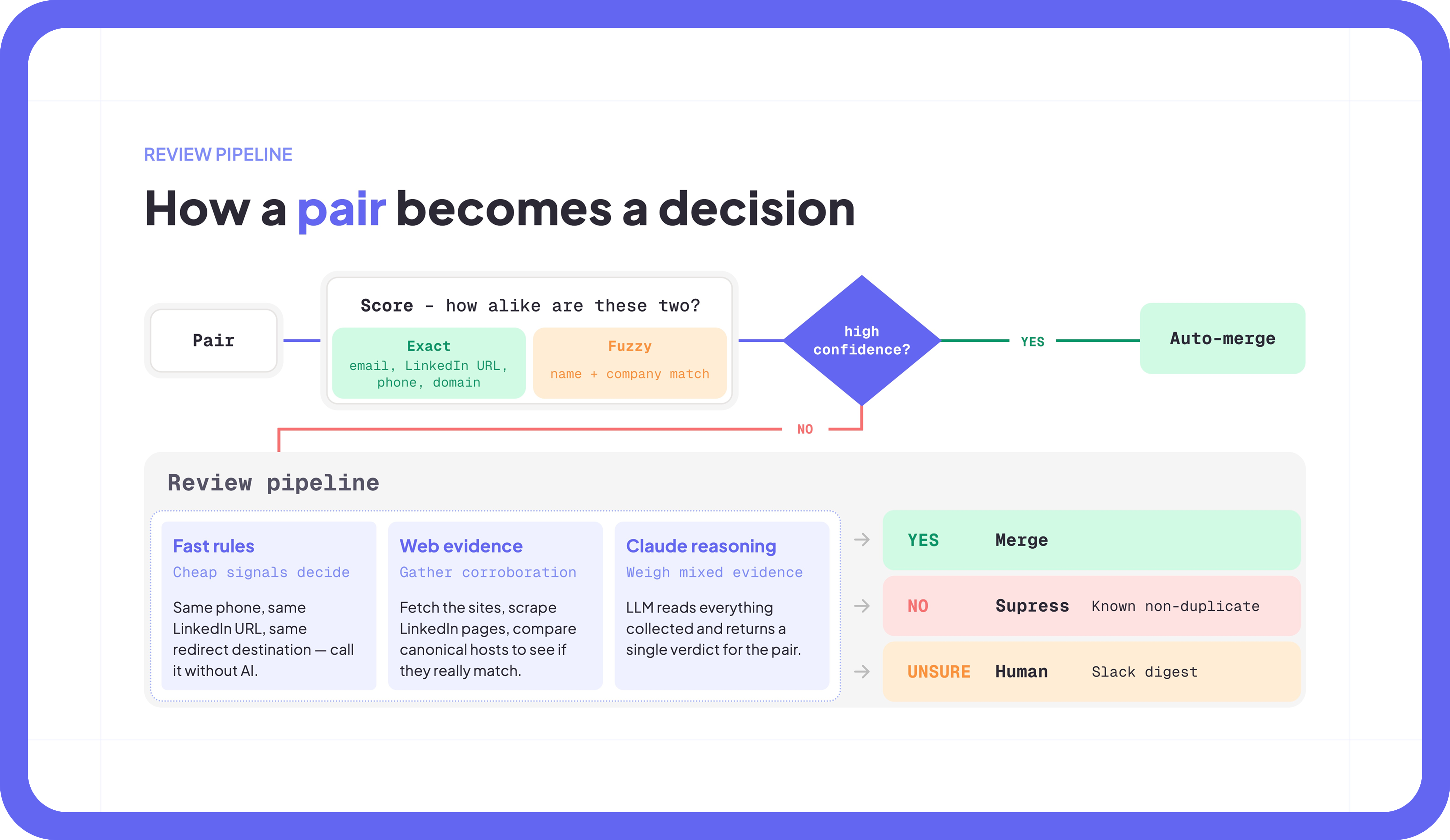
The agent runs the same loop on every candidate pair: score first, then decide.
It starts with exact matches: email, LinkedIn URL, phone number, domain. Then it moves to fuzzier signals like name plus company. If the score is high enough, the agent can auto-merge. If it is not, the pair enters a three-stage review pipeline.
- Fast rules. Cheap signals go first. Same phone number, same LinkedIn URL, same redirect destination on the company website. If the evidence is strong enough, the system does not need to spend tokens thinking about it.
- Web evidence. For the records that need more context, the agent fetches the relevant websites, scrapes LinkedIn pages, and compares canonical hosts. This is where a lot of the “looks similar but might not be the same” cases get resolved.
- Claude reasoning. Finally, the LLM reads the evidence the pipeline collected and returns a verdict.
There are three possible outcomes. YES means merge. NO means suppress and log as a known non-duplicate, so the same pair does not keep resurfacing. UNSURE goes to a Slack digest for a human to review.
That last part matters. The point of the workflow is not to remove judgment from CRM operations. It is to stop wasting human judgment on the cases that never needed it.
In Andy’s build, roughly 85 percent of pairs clear themselves. The remaining 15 percent reach a person with the sites already checked, the LinkedIn evidence pulled, and the reasoning summarized. The human still makes the call, but now it takes ten seconds instead of ten minutes.
Which, at CRM scale, is the difference between “we should really clean this up” and “this actually runs.”
Make Claude grill you first
When Andy built V1, he spent a lot of time in Claude Code’s plan mode. Plan mode is useful, but it can also produce the kind of plan that looks impressive enough to approve and long enough that you stop reading carefully. A dangerous combination.
Andy skimmed. Claude executed. The result was 944 records he had to hand-clean because the agent did exactly what the plan allowed it to do.
Harish, our Head of Engineering, pointed him to a skill from Matt Pocock called Grill Me. The idea is simple: before Claude writes the plan, it has to interview you.
What does done look like? Is the output a row count, a CSV, a Slack notification, or a merged record in HubSpot? What is the budget? Are we testing on 100 rows or running against 100,000? Who reviews the output? You, a teammate, or no one?
Once you answer those questions, the agent writes the plan. The plan is shorter because it has fewer assumptions to make. It is sharper because the constraints are explicit. And it is much harder to accidentally approve something that does not match the job you actually meant to run.
Andy now uses /grill-me before most projects, especially when the workflow touches production data.
The pattern travels well beyond dedupe. Outbound research, account scoring, campaign analysis, win/loss review, territory planning: all of these get better when the agent has to extract the operating spec before it starts building. Claude is very good at helping when it knows what “good” means. It is much less magical when it has to infer your tolerance for risk from vibes.
Q&A
How did you approach getting started?
I asked for resources, watched tutorial videos, read some guides, and none of it stuck. I’m the kind of person who reads the first line of an instruction guide and skips ahead. Having a real problem in front of me, a 733-contact backlog I actually needed to clear, was the only thing that made the learning stick. I’ve backed into the more academic side as I’ve run into problems I couldn’t solve.
How much of your day is in Claude Code now?
Most of it. My screen is split: Claude Code and Codex on one half, LinkedIn, sales DMs, calls, and email on the other. That two-thing dichotomy works because the coding agents need input every few minutes anyway, so you move between them without losing momentum.
What channels do you use it for?
Mostly outbound, but I mean that loosely. It knows my contacts, knows my voice, drafts sales-call follow-ups, and runs analytics on the back end. The dedupe agent is one specific tool. The broader use is having a teammate who knows my context across all of it.
How do you keep horizontal context across the team?
We had three different internal go-to-market repos at one point. Sam built one. Emily built one. I built one. I consolidated them. Now there’s one repo, I’m the captain, and changes go in as pull requests. The repo updates itself on a weekly schedule. It pings backend systems for new features, checks for new campaigns, and Slack-messages me before major changes.
What do you use besides Claude Code?
I’ve been switching a lot of work over to Codex. Bigger context window, fast mode, far fewer rate-limit hits. Claude Code has a friendlier voice and easier plugin installs. I use both. Anything complex goes into a coding agent.
About Claude Code for GTM
Claude Code for GTM was a private builder session and happy hour hosted at Freckle HQ for operators building real go-to-market workflows in Claude Code.
More than 50 GTM operators came through to see what people are actually building beyond the demo layer: content systems, CRM automation, TAM expansion, and agent-native GTM infrastructure. The useful parts were practical. What worked. What broke. What needed guardrails. What moved from “interesting weekend project” to something an operator could run again on Monday.
The session also previewed where Freckle is headed. We’re rebuilding Freckle to work natively inside Claude Code, so GTM teams can build complex, composable workflows directly from the terminal.
Resources
- Andy’s CRM dedupe plugin: github.com/andytoizer/crm-dedupe-plugin
- The Grill Me skill: Matt Pocock’s skills repo
- Andy’s Substack: AgentOperator
- View Andy’s full presentation: Deck
- Learn more about Freckle: freckle.io
Join us next time
We’re going to keep hosting operators who are building real GTM systems with AI, not just talking about them.
Follow the Freckle team on LinkedIn to hear about future events, or reach out to Emily directly at emily@freckle.io.
Good people. Better tools. More to come.