
Turn your CRM into a B2B ad audience engine

Freckle helps B2B companies unlock their best outbound campaigns through enabling data enrichment, research, and clean-up actions to be easily run on their lead lists. With easy-to-use templates and AI automation, non-technical users can use Freckle to significantly improve their traditional lead lists and other GTM data sources. This ultimately means they can take fewer, higher quality shots on target with creative campaigns that actually convert.
Freckle can be used by anyone in your company who is responsible for outbound tasks and building lead lists. This can vary depending on company size, but typically is one of the following roles or teams:
- Founders
- Growth teams
- Sales leaders
- SDRs and AEs
- Marketing teams
- RevOps
Yes! While we are best suited for GTM use-cases, Freckle is also used by:
- Investors (analysts and associates): who need to do research on target companies and founders.
- Talent acquisition teams and recruiters: who need to build and enrich lists of candidates and answer questions on them based on their profiles.
No. Freckle is intentionally built to be a tool for non-technical users who find it difficult to use Clay. For this reason, Freckle wouldn't be the best fit for:
- Outbound agencies: Agencies are power-users of Clay, as they can take the time to overcome the learning curve of Clay and implement complex workflows in the product. These complex workflows are valuable, but are not commonly what Freckle users are looking to accomplish.
- Large RevOps teams: These teams can often afford to have someone solely dedicated to becoming a Clay admin at their company. They also tend to have deep workflow rules and logic which they look to configure in Clay.
Freckle and Clay address the same core set of use-cases: data enrichment, research, data clean-up, and personalized messaging. The key difference between Freckle and Clay is how each tool balances configurability with usability.
Clay is a highly configurable tool which makes the product complex and difficult to use. In the same way that Salesforce often requires internal Salesforce administrators or external implementation partners, onboarding and using Clay as part of your tech stack is a time-intensive challenge that's almost impossible without staffing a dedicated user or external agency to help.
Freckle indexes on usability, with less configurability around workflow rules and logic. With Freckle, users can leverage an intuitive, easy-to-use interface and can get started in minutes. There is no need for complex setup or training, because Freckle makes GTM data enrichment easy and accessible for any team.
No. By using Freckle, you can access every integration and data provider through our product without needing a separate subscription to each. We have established relationships with each provider Freckle uses, and we’ve aggregated each of their services for you.
Freckle Templates are pre-built prompts and integrations for common actions you may want to take on your lead list data. Our template library means that you can use Freckle without any knowledge of prompt engineering, formulas, or which data providers to use in order to get the most value. Simply choose which template you want to use under Data Clean Up, Data Enrichment, or Research and get started!
As many as you like! You can have unlimited users in your Freckle account on both our Free and Pro plans.


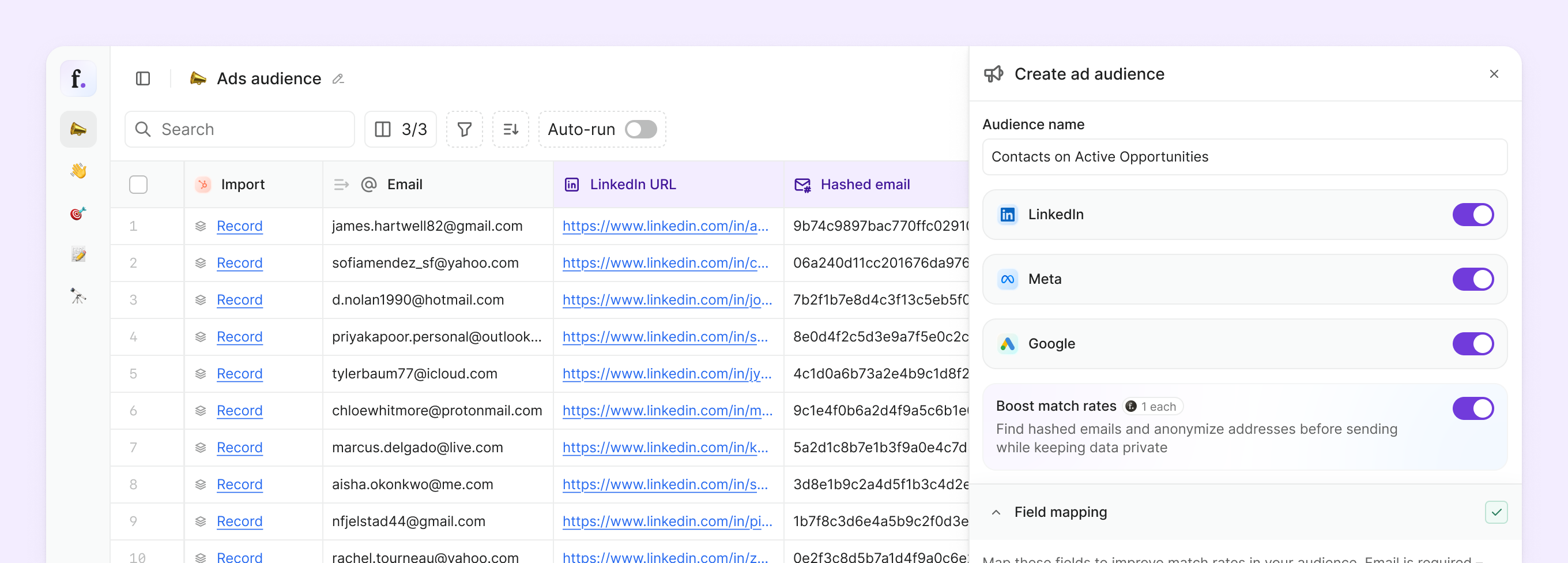

Until now, using your data for ads has been a separate, manual process.
This changes once you put your CRM data to work in ads.
01
Select your audience
Choose a segment from your data source, such as Tier 1 sign-ups or Q2 free trials and hit sync.
02
Get your data prepped
Hash email identifiers and enrich fields like LinkedIn profiles to improve match coverage.
03
Send to your ad platforms
Push to LinkedIn, Google, and Meta (coming soon). Audiences stay up to date as your data changes.
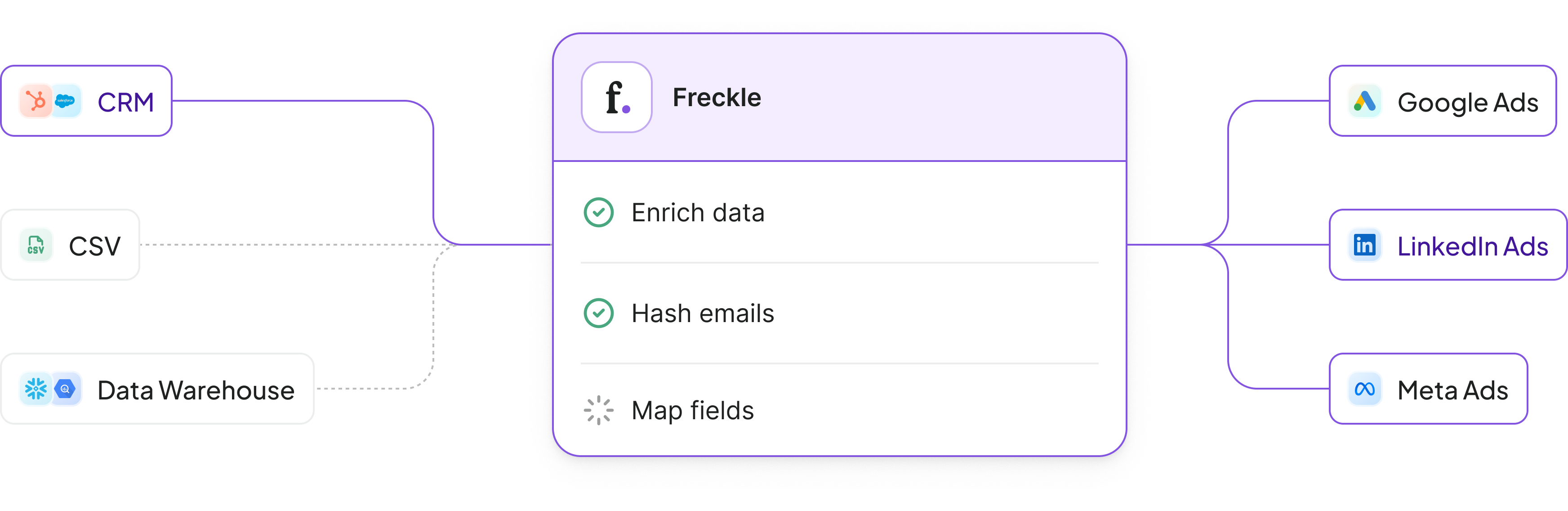






LinkedIn and Google today, with Meta coming soon.
It’s worth calling out that the same audience can be utilized across platforms, so you’re not rebuilding or managing separate lists 3X.
Yes. Freckle builds and maintains the audience, but campaigns from creative to spend still run through your company’s managed ad accounts.
Once connected, audiences stay up to date automatically. Freckle syncs on a 24 hour cadence so lists stay aligned with your CRM, including removing customers, churned accounts, or really any segment you don’t want targeted.
Freckle supports HubSpot and Salesforce natively, and that’s where the feature works best.In this flow, you define an audience from your CRM, and Freckle keeps it in sync as your data changes. That’s what makes it dynamic and removes the need to rebuild lists.
If you’re not using a CRM integration, you can still upload a list to Freckle, perform enrichments and retrieve hashed emails, and push it to your ad platforms of choice. Here, the audience is static and needs to be refreshed when your data changes.
Audience quality drops quickly when it’s managed manually.New contacts don’t get added, and existing ones stay in campaigns after they’ve become customers or fallen out of scope. Over time, targeting drifts away from what your team is actually prioritizing.
When audiences are tied directly to your CRM, that drift goes away. The list stays aligned with your source of truth without ongoing maintenance.
Ad platforms match against hashed identifiers tied to individuals (think Gmail, Yahoo, Hotmail), while most CRMs store work emails.
Freckle bridges that gap by taking the work email identifiers in your CRM and hashing them so they can be used for matching.
An email is required to include someone in an audience. From there, match quality depends on coverage, with enrichments to locate missing work emails or LinkedIn profiles improving it.
The ads audience feature is available on all Scale and Custom plans, starting at $599/month for 20,000 credits.Credits are used when you prepare data for matching. Hashing an email is one credit per successful output, and if a contact has multiple associated emails, each one counts separately.
Teams often use additional credits to improve coverage before syncing, most commonly by finding missing work emails or enriching LinkedIn profiles.
Setup is fast if you have admin level access to your CRM and ad accounts.
Once connected, you select the audience you want to use, for example a segment like Tier 1 sign-ups or Q2 free trials, and start the sync. Most teams can get from login to a live audience in under 15 minutes.
After that, it runs on auto-pilot, auto-syncing every 24 hours. There’s nothing separate to maintain (we promise).